Use two records for a One Piece collection: an exact-card collection for the variants and quantities you physically own, and a set checklist for base-card completion. The collection answers “which printing do I own and what is its RM reference?” The checklist answers “how much of this set have I completed?”
Keeping those jobs separate prevents a Red Manga, ordinary Foil and Wanted Poster version from collapsing into one price while still giving you a simple completion percentage.
The two records in one view
| Record | Identity | Quantity | Main answer |
|---|---|---|---|
| Collection | Exact collectible variant | Yes | What do I own, and what is its current reference value? |
| Set checklist | One eligible base card per tick | No—owned or missing | How far through this set am I? |
Stacked Binder currently contains 53 English One Piece set records, 4,690 collectible entries and 2,633 base checklist entries. The gap between the last two numbers is deliberate: parallels, stamps and special treatments can create several collectibles from one base card.
Start from a One Piece set
- Open the One Piece sets index.
- Choose the set you are completing.
- Select Start checklist in the strip below the set header.
- Sign in or create a free account if needed; the set intent is carried through the join flow.
- On the checklist, tap the circle on each card you own.
The card image and name still open the card page. Only the circle changes ownership, which prevents an exploratory tap from silently altering your progress. Changes save automatically, and the bar reports Saving, Saved or Retry. After a successful change, Undo reverses the last action.
You can also begin from Collections with New checklist, choose a set and open the same checklist view. Each checklist belongs to one set, while a signed-in account can hold up to 20 set checklists.
Use the filters for a physical binder check
The checklist offers All, Owned and Missing views with counts. A practical binder routine is:
- open Missing while looking through a shop or trade binder;
- use search to narrow a character or printed number;
- tap the ownership circle when a card enters your binder; and
- switch to Owned when auditing what is already filed.
There is no separate edit mode and no final Save button. The current state is always visible, which removes the trap where a user thinks they are updating but is actually opening card pages.
What “cost to complete” means
The sticky progress bar shows your owned count, percentage, missing count and an approximate RM cost for missing cards with current prices. If some missing cards are unpriced, the wording states how many priced cards contribute to the sum instead of treating the others as RM0.
It is a catalogue reference, not a shopping quote. It does not include condition, delivery, Malaysian platform fees or a guarantee that every card is available locally. Use it to understand the scale of the remaining project, then price actual copies individually.
Save exact variants in the collection
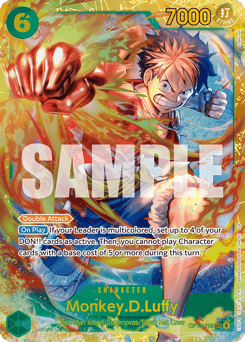
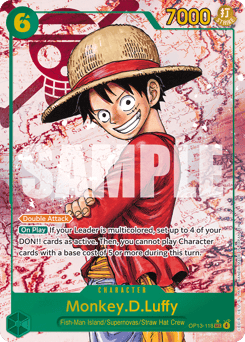
A checklist tick is intentionally broad. If you own Monkey.D.Luffy OP13-118 as both Foil and Alt Art, the set checklist still needs one base-card tick. Add both exact versions to your collection if you want the correct card list, quantities and RM total.
| Foil | Alt Art | Red Manga |
|---|---|---|
 |
 |
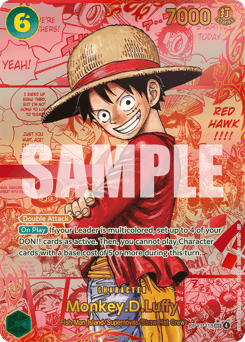 |
Those three catalogue entries share a base number but should never contribute the same price. Read the variant guide for the identification logic.
Share progress without giving edit access
A checklist can use the same view-only sharing system as a collection. The recipient can see progress, but ownership changes remain with the signed-in owner. Disable the share link when you no longer want it available, and avoid combining high-value collection details with home-address or storage information.
Common questions
Do I need an account to start a One Piece checklist?
Yes. A set checklist is tied to a free account so its progress is available across signed-in devices. An ordinary browser collection can still begin without signing in.
Do parallels need separate checklist ticks?
No. The current checklist uses one tick per eligible base card. Exact parallels belong as separate entries in the collection.
Can I track more than one One Piece set?
Yes. Each checklist covers one set, and an account can currently hold up to 20 checklists.
What happens if a save fails?
The bar keeps the failed-change count visible and offers Retry. A later successful change does not hide an earlier failed batch.
Can another person edit a shared checklist?
No. Shared checklist pages are view-only; only the owner can change the owned cards. Feature behaviour and catalogue counts checked 29 August 2026.