Put a card in Collection when you own that exact printing, in Want list when you want that exact printing, and in a Set checklist when you only need to mark the base card as part of a completion project. Those are three different questions, so one card can legitimately be represented in more than one layer while your intent changes.
The clean model is: own · want · complete.
The three layers
| Layer | Use it when… | Identity | What it calculates |
|---|---|---|---|
| Collection | You physically own the card. | Exact printing and quantity. | Card count and current RM reference total. |
| Want list | You want to acquire that card. | Exact desired printing. | Current total, 30-day movement and buying-opportunity context where available. |
| Set checklist | You are completing a particular set. | One eligible base card per tick. | Owned percentage, missing count and approximate cost to complete. |
Collection: the factual record
A collection should contain only cards you own. Choose the exact set, language, collector number and treatment, then adjust quantity for duplicates. The RM value is only as accurate as that identity.
A browser collection lets a guest begin immediately. Signing up imports the browser collection and makes account collections available across signed-in devices. Separate named collections can represent a personal binder, trade stock or another purpose without mixing all values into one number.
Do not add a dream card to inflate the collection total. If it has not been acquired, it belongs in Want list.
Want list: the intention record
The Want list stores an exact card you may acquire. That exactness matters: “Luffy manga” is not enough when several sets and treatments exist. Choose the printing whose price you actually want to watch.
The useful default is not simply highest price. A wanted card's recent drop, 90-day range and current reference can help decide which cards deserve another look. It remains decision support, not an automatic signal that a card is cheap or likely to rise.
When you acquire a wanted card, Got it adds it to a collection and removes it from the Want list in one flow. That transition preserves the difference between intent and ownership.
Set checklist: the project record
A checklist is attached to one Pokémon or One Piece set. It does not need quantity and does not attempt to list every variant as a separate completion requirement. Its job is progress: 42 of 120 owned, 35%, 78 missing.
Use it when opening product, sorting a set binder or checking a trade table. Tap the circle to change ownership; use the card image or name when you need the exact card page.
One Luffy, three possible decisions
Imagine you are completing Carrying On His Will and looking at Monkey.D.Luffy OP13-118:
- Tick OP13-118 in the set checklist because you own a version of the base card.
- Add the Foil to Collection because that is the physical printing in your binder.
- Add the Wanted Poster to Want list because that is the upgrade you hope to acquire.
| Owned | Wanted | Checklist family |
|---|---|---|
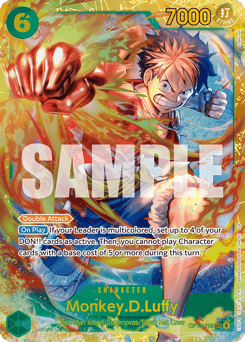 Foil in Collection |
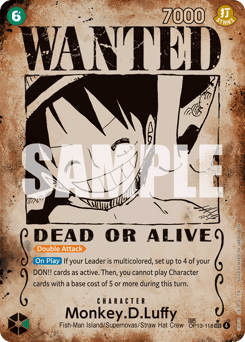 Wanted Poster in Want list |
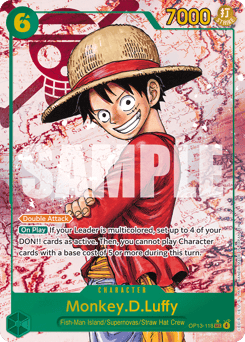 One OP13-118 tick |
This is not duplication. Each layer stores a different statement. Confusion starts only when the same label is expected to mean all three.
A five-minute weekly routine
- Update quantities for cards bought, sold or traded.
- Move acquired cards from Want list with Got it.
- Open Missing on the active set checklist before shopping.
- Correct any card whose image or treatment does not match the physical copy.
- Read collection totals as dated references, not permanent appraisals.
That routine keeps the numbers connected to reality without turning collection management into a second hobby.
Common questions
Should a card I want be added to my collection?
No, not until you own it. Save the exact desired printing to Want list so the collection total remains factual.
Can a card be owned and still appear on my Want list?
It can if you are seeking another copy or treatment, but the clearer workflow is to use Got it for the acquired printing and want the exact version still missing.
Does ticking a checklist add the card to my collection?
No. A checklist records base-card completion; adding an exact collectible to Collection is a separate action.
Which layer tracks duplicate quantities?
Collection. Want list identifies desired cards, while a checklist is an owned-or-missing tick without quantity.
Can all three include Pokémon and One Piece cards?
Collections and Want list can hold exact supported cards across games. Each set checklist remains tied to one specific set. Product behaviour checked 29 August 2026.